I’m a software engineer in California. I work on the tools and memory
behind WRITER Agent.
The watershed
Water the hillside and you can watch the runoff make its way down to
the inlet.
0patches taking root
0litres released
Moisture in the soil Your flight path
Soil moisture is saved on this device.
Grove 1 of 3
The south meadow
Follow the small cross on the ground.
0% watered
Your approach
Set it down gently.
Lower the power, level the wings, and ease the nose up just above the
water.
WS climb / descendAD bankSpace waterR reset viewEsc let it fly
Flying requires WebGL 2. You can still read all three stories.
Trip photos coming soon
TanzaniaJapanAlaska
Rewriting the WRITER Agent harness
I led the rewrite of the harness behind WRITER Agent. It’s the
part of the product that lets the agent carry a task through
several steps, like finding information in a set of documents and
using it to put together a presentation. As more people on our
team began building tools for the agent, I wanted them to be able
to add something new with confidence that the workflows customers
already depended on would keep working.
Giving people a say in what the agent remembers
I led our work on agent memory. If you’ve shown the agent how
your team writes a weekly report, it’s handy to have it remember
that next Friday. And when your team changes how it works, you
can ask the agent to remember the new instructions or forget the
old ones.
Building presentations in WRITER Agent
I built the feature that lets you create a PowerPoint
presentation with the agent. You can start from scratch or give
it a template your team already uses. I cared about that second
case because teams put real thought into how they present their
work, down to how they lay out a chart or a comparison.
Alibi Shift
Alibi Shift is a deduction game I built for iOS. A theft took
place, and you have three snapshots of the evening, ten minutes
apart. You know which room the theft happened in. To find out who
was there, you piece together where everyone was from sightings
and clues about who moved between rooms. The puzzles run offline.
I recently reworked the first lesson. At nine o’clock, Ada is in
the study and Beck is in the gallery. There are three people,
three rooms, and one person in each room. Where does that leave
Cleo? Tap a room and you’ve made your first move on the actual
board. That was a much better way to explain the game than asking
someone to read the rules up front.
Anchors
Anchors is an iOS app for saving places. The part of a
recommendation I want to keep is usually what my friend said
about the place. In Anchors, if you save a spot from a friend’s
list, their advice comes with it. You can add a private note of
your own and have it come up when you get there.
I spent a surprising amount of time on one question the app asks
after a visit. “Would you go back?” makes sense after you’ve
stayed a while and left. It’s a strange thing for your phone to
ask while you’re still there. The app works out visits on the
device, and if you come back before it asks, it withdraws the
question. What you write down afterward is there the next time
you visit.
Skills and Software Factory
I use agents to write software, so I get to see which instructions
I keep giving them. Some have become skills I use across projects.
One helps trace a reported bug back to the code that caused it.
Another runs the application and tries the change through the
same screen or command that someone using it would.
Lately I’ve been building a local tool I call Software Factory.
It grew out of a problem I have when several changes are underway
at once. I come back to a branch, see that a check passed, and
have to figure out whether that was before or after the last edit.
Factory records what I expected to happen, the command that
checked it, its output, and the state of the checkout. If the
code moves on, it can tell me which result needs another look.
GhostHost
Before WRITER, I built a chatbot that small businesses could put
on their websites. Each business supplied its own material. For a
restaurant, that might include a menu, opening hours, and details
about the space. GhostHost looked up the relevant passages in
Pinecone when a guest asked a question.
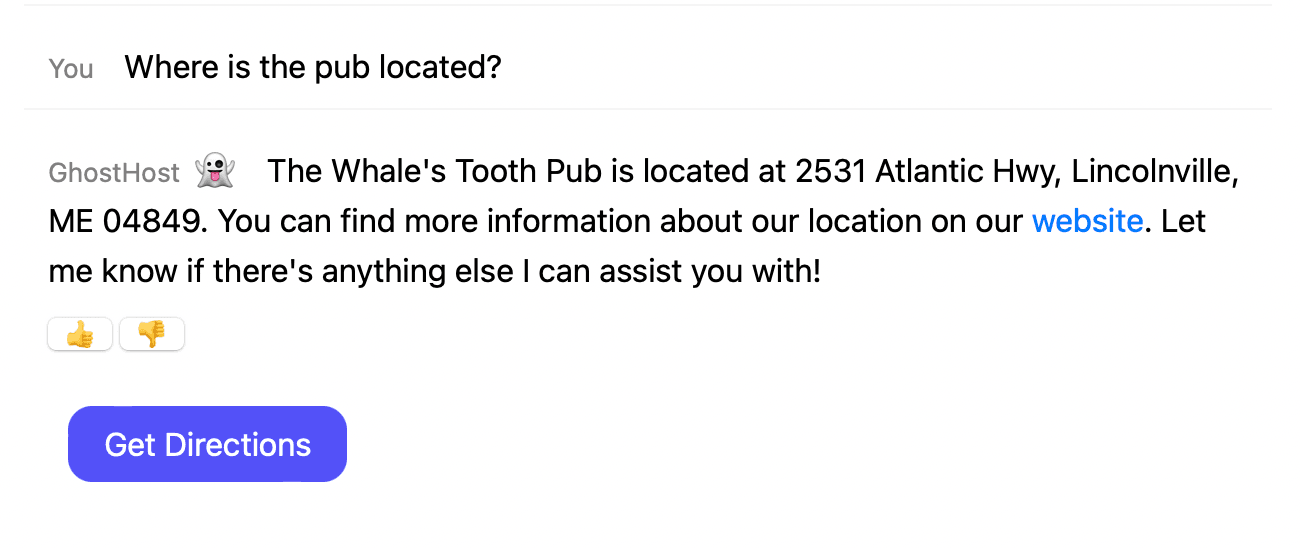
I liked working on what came after the answer. If you asked where
the pub was, GhostHost could put a directions button underneath
the address. If you wanted a table, an OpenTable integration let
you make a reservation from the chat.